
Examinations in Cosmo School ERP
Create an exam, publish the date sheet and let teachers enter marks for their own subjects. Results, grades and positions are calculated for you, with subject analysis and printable report cards. A built-in question bank with six question types, including Urdu, feeds a paper generator that can pick questions automatically and print versions A to D with answer keys.
Key benefits
Papers in minutes
Build a paper from your question bank, or let the generator pick by chapter and difficulty.
No manual calculations
Totals, percentages, grades and positions are worked out automatically.
Urdu supported
Urdu questions display right-to-left on screen and in print.
Admit cards
Print roll-number slips; fee defaulters can be held back if you choose.
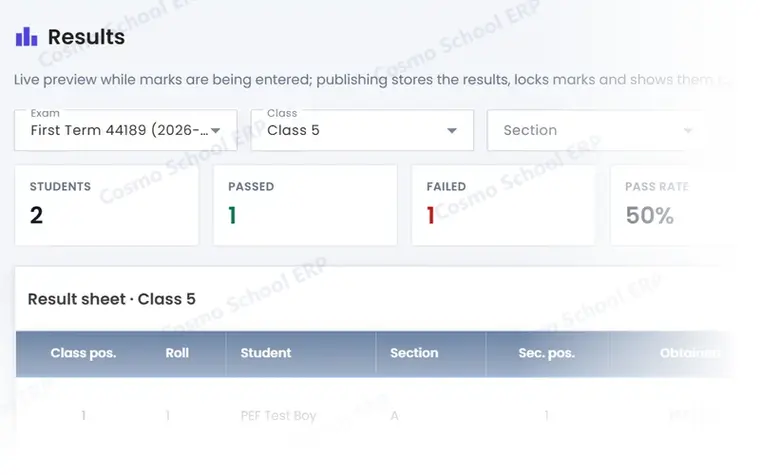
A partial view of the screen
This is part of a real Examinations screen in Cosmo School ERP, shown with test data. In the free demo we open the complete screens and walk through each step with you.
Everything in Examinations
Exams and results 7
- Exams and termsCreate exams per term and academic year.
- Date sheetsSchedule papers by class with dates and timings.
- Marks entryTeachers enter marks for their subjects; the admin locks and publishes.
- Results and positionsTotals, percentages, grades and class positions with subject analysis.
- Grading scaleDefine grade bands and remarks for your school.
- Report cardsPrintable report cards and mark sheets per student or class.
- Admit cardsRoll-number slips with the date sheet, optionally excluding defaulters.
Question bank and papers 7
- Question bankMCQ, true/false, fill in the blank, short, long and matching questions.
- Excel import of questionsLoad a chapter's questions from a spreadsheet.
- Question paper builderSections, instructions, marks and answer lines, laid out for print.
- Auto-pickPick questions automatically by chapter, type and difficulty.
- Versions A to DShuffle questions and options into several versions of the same paper.
- Answer keysPrint the answer key for each version.
- Online quizzesTimed quizzes for students with automatic marking.
Related modules
Academics
Classes, sections, subjects, allocations, timetable, rooms and academic calendar.
10 featuresExploreTeaching & Learning
Lesson plans, class diary, assignments, study material, video lectures, online classes and tasks.
9 featuresExploreCertificates & ID Cards
Leaving, character and bonafide certificates, editable templates and student and staff ID cards.
7 featuresExploreStudent Life
Photo gallery, achievements, hall of fame and Learn 'n' Fun educational games.
8 featuresExploreWant to see Examinations live?
Book a free demo and we will show this module with data like your own school's.